
Screenless Dual-Camera Book Reader with Spoken Playback
Two fixed cameras capture an open book while tactile controls, page lighting, and spoken feedback make scanning and playback accessible without a screen.
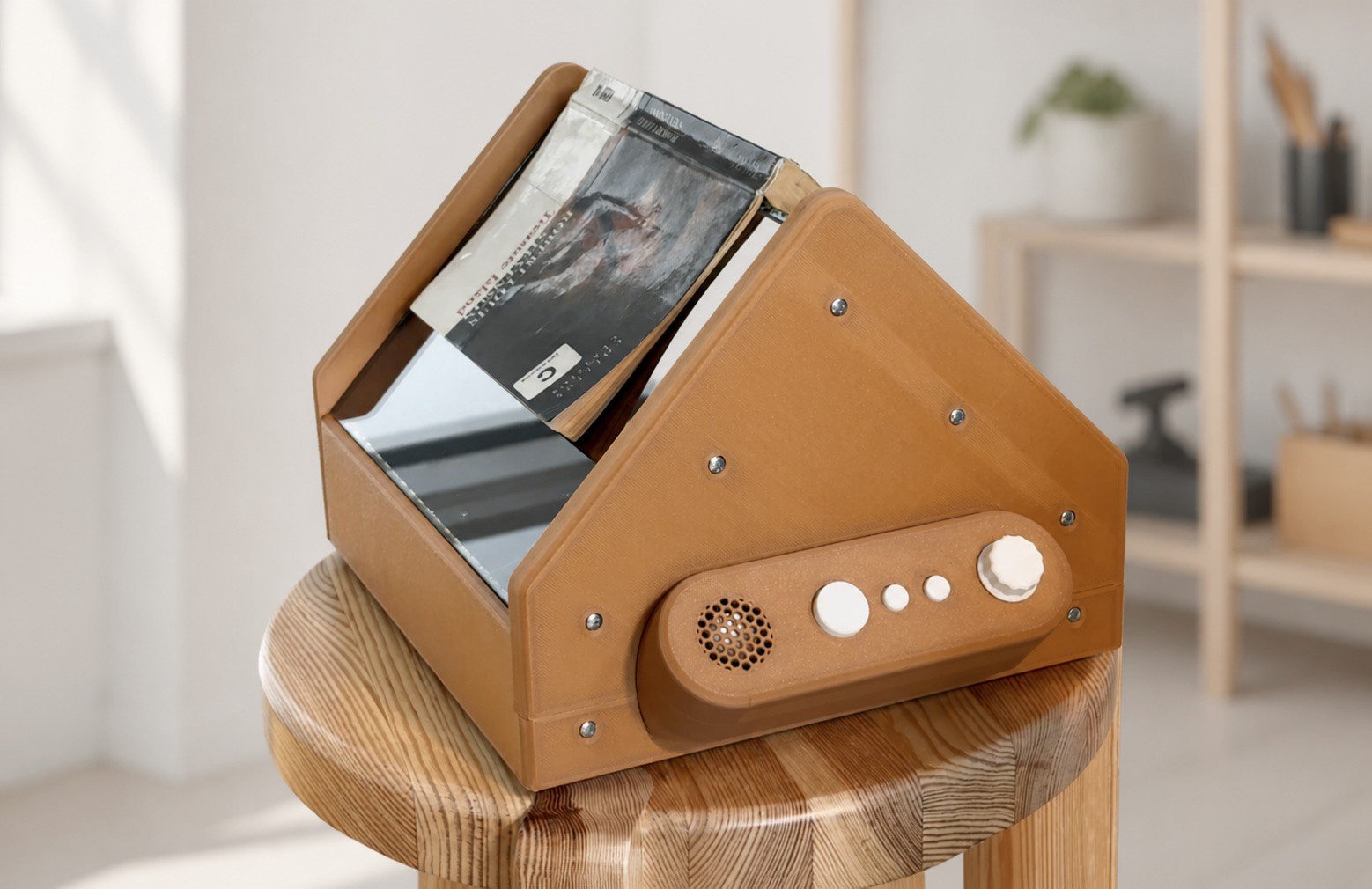
Overview
This reader turns a spread of printed pages into spoken audio. An open book rests on a V-shaped glass surface, one camera views each page, and fixed lighting gives the recognition software a repeatable image. A large control starts a scan or stops playback; two smaller controls request summaries, and a rotary input adjusts volume.
The physical interface is designed to work by touch. Controls differ in size and position, while an audible processing cue tells the listener that a scan is still underway. Book-identification tags associate saved pages and summaries with the correct volume without requiring an on-screen menu.
The frame is part of the imaging system. Glass supports, camera brackets, and lighting mounts need to hold their positions after calibration. The resulting build favors repeatable page placement and a predictable interaction over portability or a folding mechanism.
Parts
This parts table is seeded from the Blueprint project.
| Part function | Canonical name | Qty | Type | Size | Est. cost |
|---|---|---|---|---|---|
| Main Host Computer | Raspberry Pi 5 Model B | 1 | Controller | 85x56x17mm | $80.00 |
| Left Page Camera | 16MP Wide-Angle Raspberry Pi CSI Camera | 1 | Sensor | 38x38x12mm | $35.00 |
| Right Page Camera | 16MP Wide-Angle Raspberry Pi CSI Camera | 1 | Sensor | 38x38x12mm | $35.00 |
| Left Panel NFC Reader | NXP PN5180 NFC Front-End Module | 1 | Sensor | 50x30x5mm | $25.00 |
| Right Panel NFC Reader | NXP PN5180 NFC Front-End Module | 1 | Sensor | 50x30x5mm | $25.00 |
| Scanner Base Plate | 6061 Aluminum Sheet | 1 | Structural | 420x320x3mm | $18.00 |
| Left Page LED Board | Custom 20-LED Illumination PCB | 1 | Module | 180x15x8mm | $15.00 |
| Right Page LED Board | Custom 20-LED Illumination PCB | 1 | Module | 180x15x8mm | $15.00 |
| Left V-Glass Panel | Tempered Glass Panel | 1 | Structural | 300x220x4mm | $14.00 |
| Right V-Glass Panel | Tempered Glass Panel | 1 | Structural | 300x220x4mm | $14.00 |
| Left Glass NFC Antenna | PN5180 External NFC Loop Antenna | 1 | Module | 250x180x2mm | $12.00 |
| Main Regulated Power Supply | Raspberry Pi 27W USB-C Power Supply | 1 | Power | 56x47x30mm | $12.00 |
| Right Glass NFC Antenna | PN5180 External NFC Loop Antenna | 1 | Module | 250x180x2mm | $12.00 |
| Built-In Audio Speaker | 4 Ohm 3W Full-Range Speaker | 1 | Actuator | 50x50x20mm | $5.00 |
| NFC Controller | Raspberry Pi Pico | 1 | Controller | 51x21x3.9mm | $4.00 |
| Start Stop Button | Large Panel-Mount Momentary Tactile Pushbutton | 1 | Sensor | 30x30x20mm | $4.00 |
| M3 Assembly Screws | M3x12mm Button Head Socket Cap Screws | 40 | Misc | M3x12mm | $3.20 |
| Glass Edge Gasket | U Channel Silicone Edge Trim | 2 | Misc | 300x5x4mm | $3.00 |
| M3 Heat-Set Inserts | M3 Brass Heat Set Inserts | 40 | Misc | M3x5x4mm | $2.40 |
| Recent Pages Button | Panel-Mount Momentary Tactile Pushbutton | 1 | Sensor | 16x16x15mm | $2.00 |
| Story So Far Button | Panel-Mount Momentary Tactile Pushbutton | 1 | Sensor | 16x16x15mm | $2.00 |
| Volume Rotary Control | EC11 Incremental Rotary Encoder with Push Switch | 1 | Sensor | 15x12x20mm | $2.00 |
| Book Identification Tag | 13.56MHz NFC Tag | 1 | Sensor | 45x45x1mm | $1.00 |
Estimated total for the modeled parts: $340.60.
How It Works
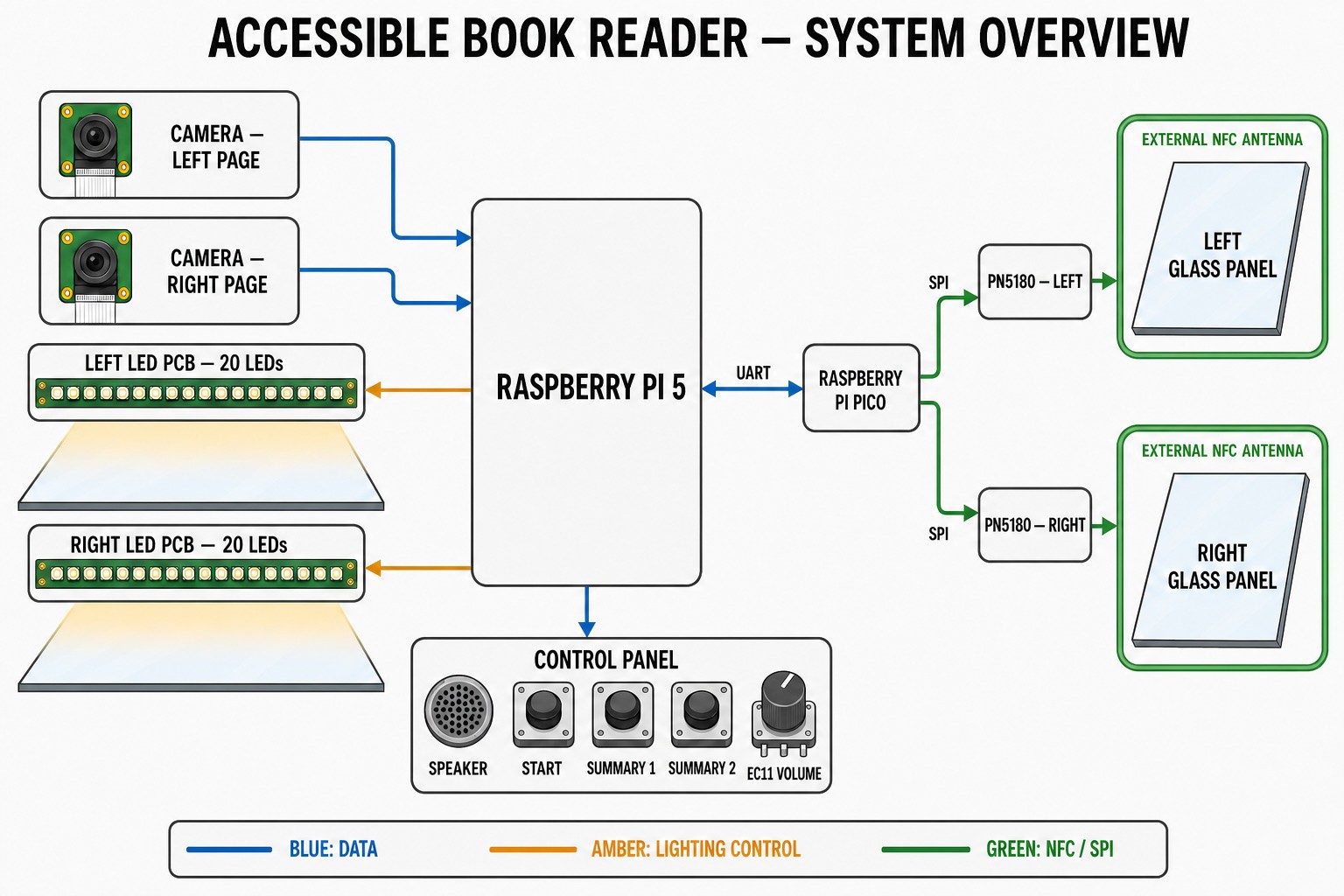
The main controller captures both cameras, applies a separate optical correction profile to each image, and runs text recognition. Text cleanup removes unwanted line-break hyphens and preserves paragraph boundaries before the speech stage produces audio. The same stored page text supports either a recent-page summary or an overview of completed groups.
Two illumination boards light the glass from shallow angles. Their placement reduces reflections into the lenses while maintaining exposure across both pages. Camera ribbons connect to dedicated high-speed interfaces, and the audio output needs a compatible interface or converter followed by an amplifier and speaker.
A secondary controller manages two NFC readers and loop antennas around the glass panels. It exchanges book-identification data with the main controller over UART, with crossed transmit and receive lines and a shared reference. The three buttons and rotary input complete the user interface; their final pin assignments must match the installed firmware.
Power distribution must account for the controllers, cameras, illumination, NFC readers, and audio stage together. Model connections indicate subsystem relationships, but do not establish a complete circuit or a verified current budget. Separate lighting and audio load paths from logic signals, and verify each branch before integration.
Build Steps
-
Build the page-support frame. Assemble the center ridge and outer glass supports, add protective padding, and cover exposed edges. Check that both panels sit securely and that an open book can rest on the cradle without rocking.
-
Fit cameras and lighting. Aim one camera at each complete page with a small framing margin. Test matte and glossy paper while adjusting the light angles, then tighten the mounts once the images are evenly lit and free of bright reflection streaks.
-
Complete the electrical plan. Assign camera interfaces, controls, UART, NFC connections, and audio wiring. Resolve each module’s supply and logic requirements and calculate the branch loads before making the permanent harness.
-
Bring up the subsystems separately. Verify each camera, then the lighting, audio stage, controls, and book-tag readers. Confirm left and right page order and test that changing books selects the intended stored history.
-
Calibrate the fixed optics. Photograph a printed grid on each side and save independent lens-correction profiles. Check focus and small-text recognition at the outer corners; repeat calibration after any change to a camera, glass support, or focus setting.
-
Test the reading interaction. Capture a full spread, inspect the recognized text order, and play it aloud. Check the processing cue, both summary actions, volume direction, and the ability to interrupt playback while other processing is underway.
-
Finish and run a longer session. Secure the harness, add strain relief to camera ribbons, and keep the speaker opening clear of the book. Scan several spreads and switch between tagged books while checking for recognition errors, heat buildup, or missed controls.
See the complete build steps in Blueprint.
Notes
Recognition quality depends on mechanical repeatability as much as software. A camera that shifts after calibration can produce poor text at the page edges even when the center looks sharp. Keep the lighting and frame rigid, and include glossy paper and small type in the acceptance checks.
Processing time varies with the recognition and speech configuration, so the audible cue and interrupt behavior matter more than a promised response time. The Blueprint provides a subsystem plan and modeled inventory; complete the pin assignments, lighting drivers, supply budget, and amplifier circuit before treating it as a build-ready schematic. Any service-dependent recognition or summary configuration also needs a clear failure response when its connection is unavailable.